For VendorsGetting StartedSign Up as a Vendor (How to Register)
⏱️ 3 min read
Sign Up as a Vendor (How to Register)
Join SoftwareHope as a verified software vendor through our streamlined 3-step onboarding engine. SoftwareHope connects high-intent B2B software evaluators directly with your product with 0% commission on inbound leads.
⚡
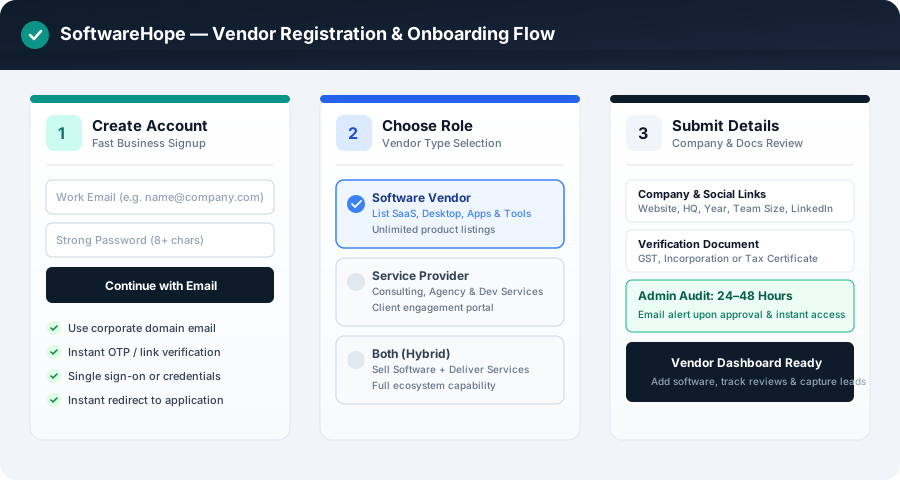
At a Glance: 3-Step Vendor Registration & Instant Onboarding
Step 1 — Account & Corporate Email: Enter your name, corporate business email, company name, and official website URL.
Step 2 — 6-Digit Email OTP: Verify your email authenticity in seconds with an auto-focused one-time security passcode.
Step 3 — Product Profile & Launch: Choose Software (SaaS) or Services, set your primary category, and launch your profile.
Fast-Track Approval: Corporate email matching your website domain unlocks instant 0-minute approval to your full Vendor Dashboard!
To verify work email authenticity without tedious password resets:
A 6-digit one-time passcode (OTP) is automatically dispatched to your corporate inbox.
Auto-focused single-digit input boxes allow fast keyboard or paste entry.
A 60-second resend countdown protects your delivery rate.
Once the 6-digit code is verified, your authenticated session is generated immediately.
👤 Step 2: Listing Type & Initial Product Profile
Select how your company goes to market:
Listing Type: Choose between "Software" (for SaaS, desktop applications, mobile tools, developer APIs) or "Services" (for digital agencies, IT consultancies, custom software development shops).
Product / Software Name: The official title of your primary tool.
Primary Category: Choose the best taxonomy match (e.g., Project Management, CRM, AI Video, Cybersecurity).
Company Size Tier: Select your headcount bracket (1–10, 11–50, 51–200, 201–500, 501–1000, 1000+).
Key Market Competitors: Add 2 to 3 main competitors (e.g., Jira, Asana, Linear) so SoftwareHope can seed your comparison tables.
Value Tagline: A crisp 10–150 character hook summarizing your core benefit.
🛡️ Step 3: Domain Verification & Portal Access
SoftwareHope enforces strict trust and anti-impersonation standards:
Automatic Instant Approval (Corporate Domain Match): If your email domain matches your company's website root domain (e.g. [email protected] registering stripe.com), your vendor account is instantly approved!
Technical Domain Verification (Domain Mismatch): If you registered using a subsidiary or personal email, you can verify ownership in under 60 seconds using:
1. DNS TXT Record: Add a temporary TXT token to your DNS records.
2. HTML Meta Tag: Add a meta tag verification string to your homepage <head>.
3. Well-Known File: Upload a text verification file to /.well-known/softwarehope-verification.txt.
Dedicated Review SLA: If you prefer manual review, our Trust & Safety team processes submissions within 2 to 4 business hours.
💡
Pro TipRegistering with an email that matches your software's website domain bypasses the manual queue entirely and grants immediate access to your full Vendor Dashboard!
Was this article helpful?
SoftwareHope AI Copilot
Grounded in verified SoftwareHope indexes
Guest Trial — Hello!
10 of 10 messages remaining.Sign in for 50 daily requests →
How can I help you today?
Compare pricing, search features, or generate grounded software recommendations dynamically.
.png)